
Documentation / 1.14.1
Swarms
Have several agents work on one request at the same time, on your computers and models, and get one answer or one change back.
A swarm is several agents working on one request at the same time, each in a chat of its own. An agent is the AI working on its own part of the job, with its own model, tools, and notes. Toskar hands out the parts, watches the agents work, and puts their work together into one answer.
In a split, Toskar splits your request into parts, and each agent does one part. In a race, agents on different models each do the whole request, and Toskar keeps the best result or combines them.
Agents only run at the same time where they really can: on different computers, on different models, or on a model set to run more than one agent at once. With one model on one computer, a swarm runs as one agent and says why. Swarms are off until you ask for one, because they use more of your computers and take longer than a single answer.
Ask for one with Use a swarm in Chat options, by saying use a swarm in your message, or with a profile whose strategy is Swarm. The terminal, VS Code, coding agents, and the API can start one too.
In a chat with a folder, an Admin can give a swarm a task, such as fixing failing tests. Each agent works in its own copy of the folder, and Toskar merges their changes, runs the project's tests, and asks before it puts the change in your folder.
While a swarm works, Chat shows a lane for each agent, with Stop and Open. Each agent's chat is kept, in the chat's project, so you can read and continue it later.
What you need
- An installed model that calls tools (Choose and manage models).
- A Member or Admin account. Visitors and the guests of a chat page can't start a swarm (Share Toskar with other people).
- For agents that really run at once: a second computer (Connect your computers), a second model, or Agents at once raised on a model (below).
- For a task in a folder: an Admin account, and a folder, ideally one in Git, chosen for the chat or its project (Projects).
- To change a profile's swarm, or Agents at once: Advanced mode, in Settings.
Split or race
A swarm is like handing a job to a small team instead of one person. Split it when the job has parts that don't depend on each other. Race it when you want a second opinion, or two tries at a hard problem.
| Question | Split | Race |
|---|---|---|
| What each agent does | One part of the request, such as running costs, cold weather, or noise | The whole request, each on a different model |
| What you get | One answer, or one change, written from every agent's work | The best answer, or the answers combined. In a folder, the best change |
| Helps with | Research with several questions in it, and work on separate files | Hard questions and fixes where a second try often does better |
| Doesn't help with | A quick question, or a request that can't be split. It runs as one agent | One model. A race needs at least two |
A swarm costs more than one answer: every agent reads the request and does its own work, and Toskar merges at the end. It finishes sooner only when the agents really run at the same time. One computer with one model answers one request at a time, so there a swarm runs as one agent, and the line under the answer says: One agent: this computer can't run more than one at a time with this model.
Tip: Auto never picks a swarm, and a swarm profile still answers quick questions directly. A swarm runs only when you ask for one.
Start a swarm in Chat
- Open Chat and type your request.
- Choose Chat options, and set Use a swarm to Split or Race.
- Check that a Swarm chip shows above your message, then send it.
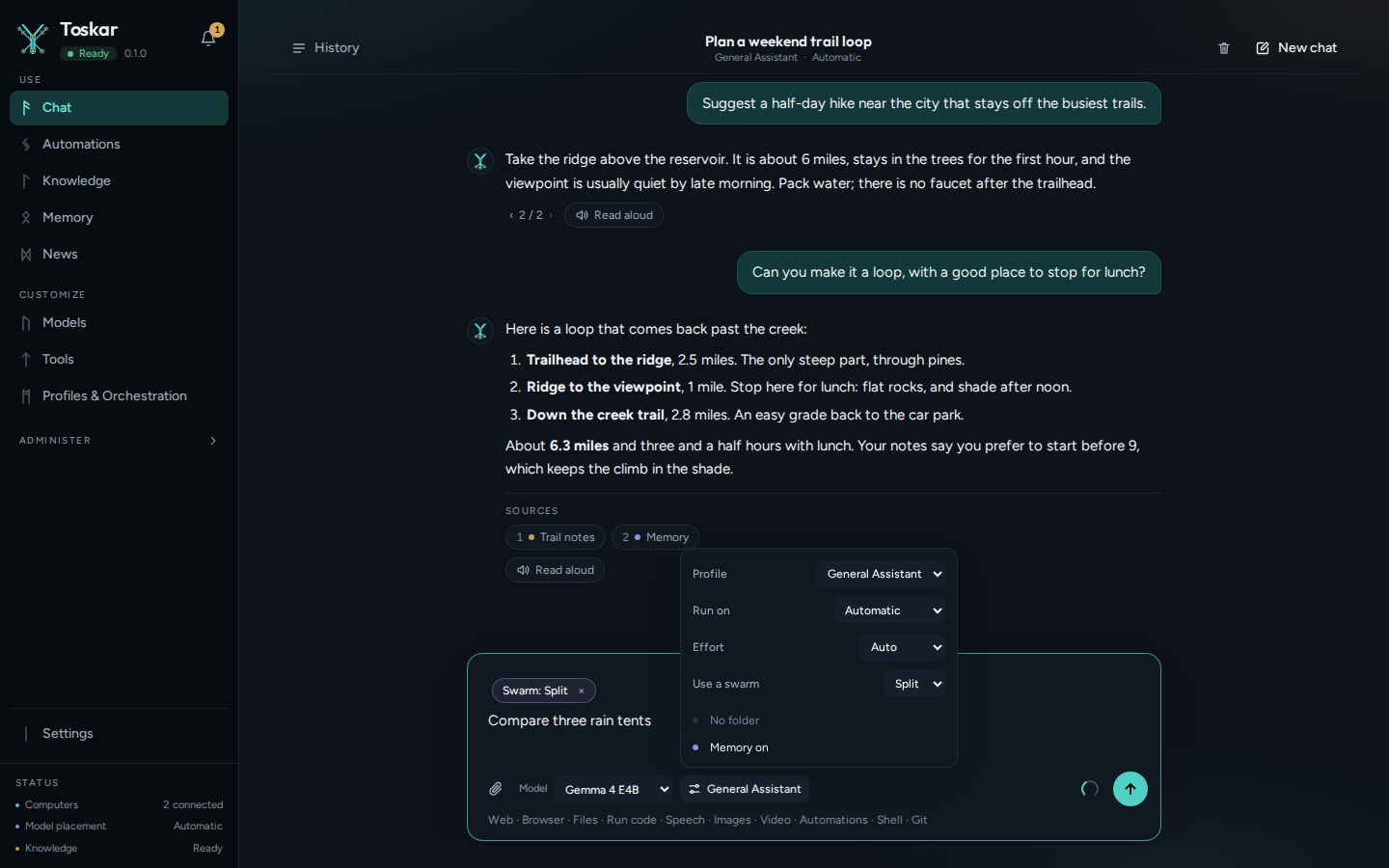
Only that message uses a swarm; the next one is answered as usual. You can also say it in the message itself: end it with use a swarm, or with use 3 agents to name how many (2 to 8). Toskar understands this in English.
Make a profile that always uses one
- In Settings, turn on Advanced mode.
- Open Profiles & Orchestration, and choose Edit on a profile.
- Open Strategy and computers, and set Strategy to Swarm.
- Choose Split or Race under Mode.
- Under Models, add the models the agents use, in order. A race needs at least two, one agent each. A split takes them in turn.
- If you like, set the most Agents, Tokens, and Minutes a swarm may use, then choose Save profile.
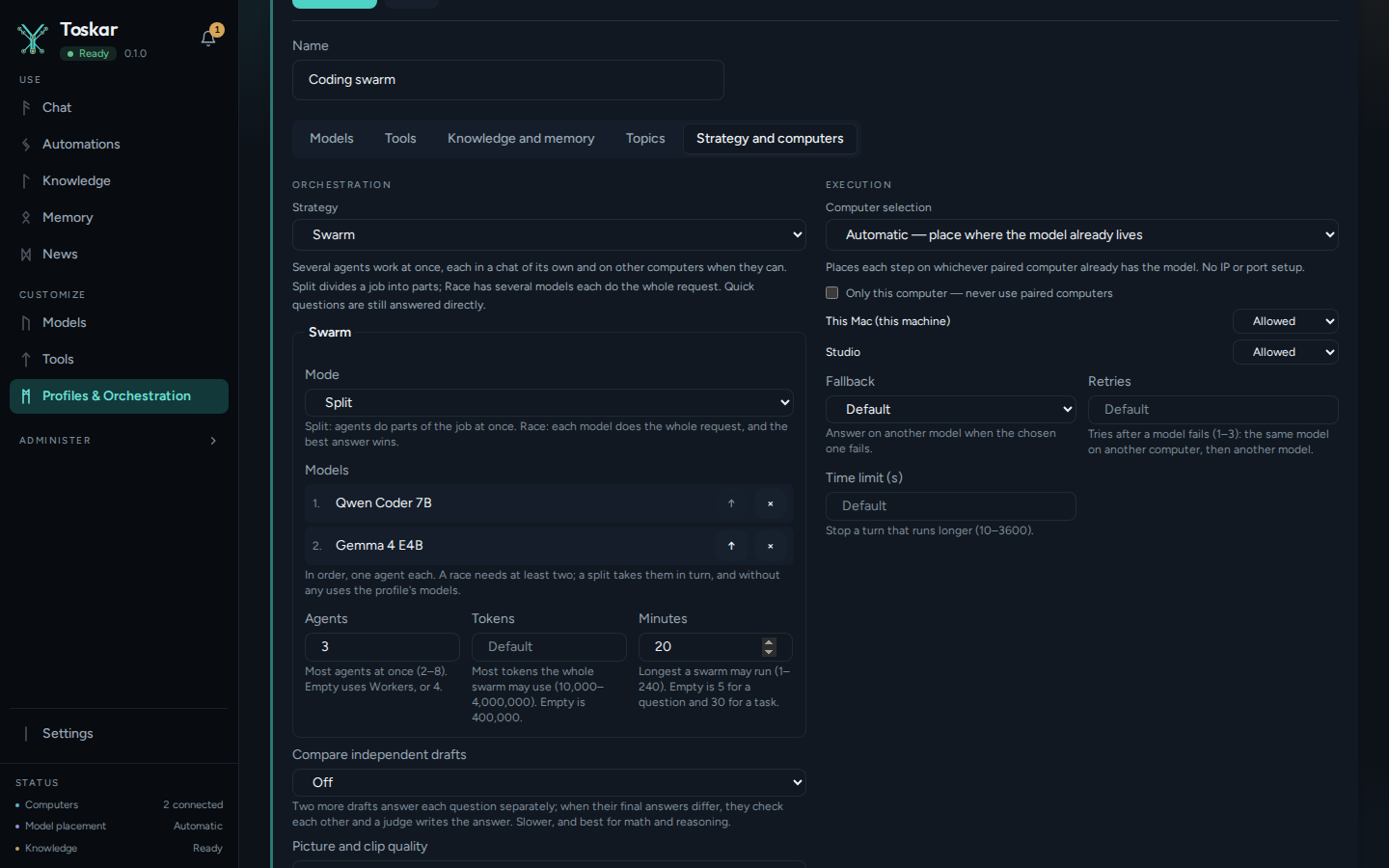
Choose models on different computers, or more than one model, so agents can run at the same time. Chats with this profile use a swarm for real work, and still answer a quick question directly.
Watch the agents
While a swarm works, Chat shows a lane for each agent above the answer. Each lane shows the agent's part, the computer and model it runs on, and how it's doing: Queued, Working, Done, Failed, Stopped, or Out of budget. A working agent shows its latest steps, and a finished one a short summary. In a race, the winner says Chosen.
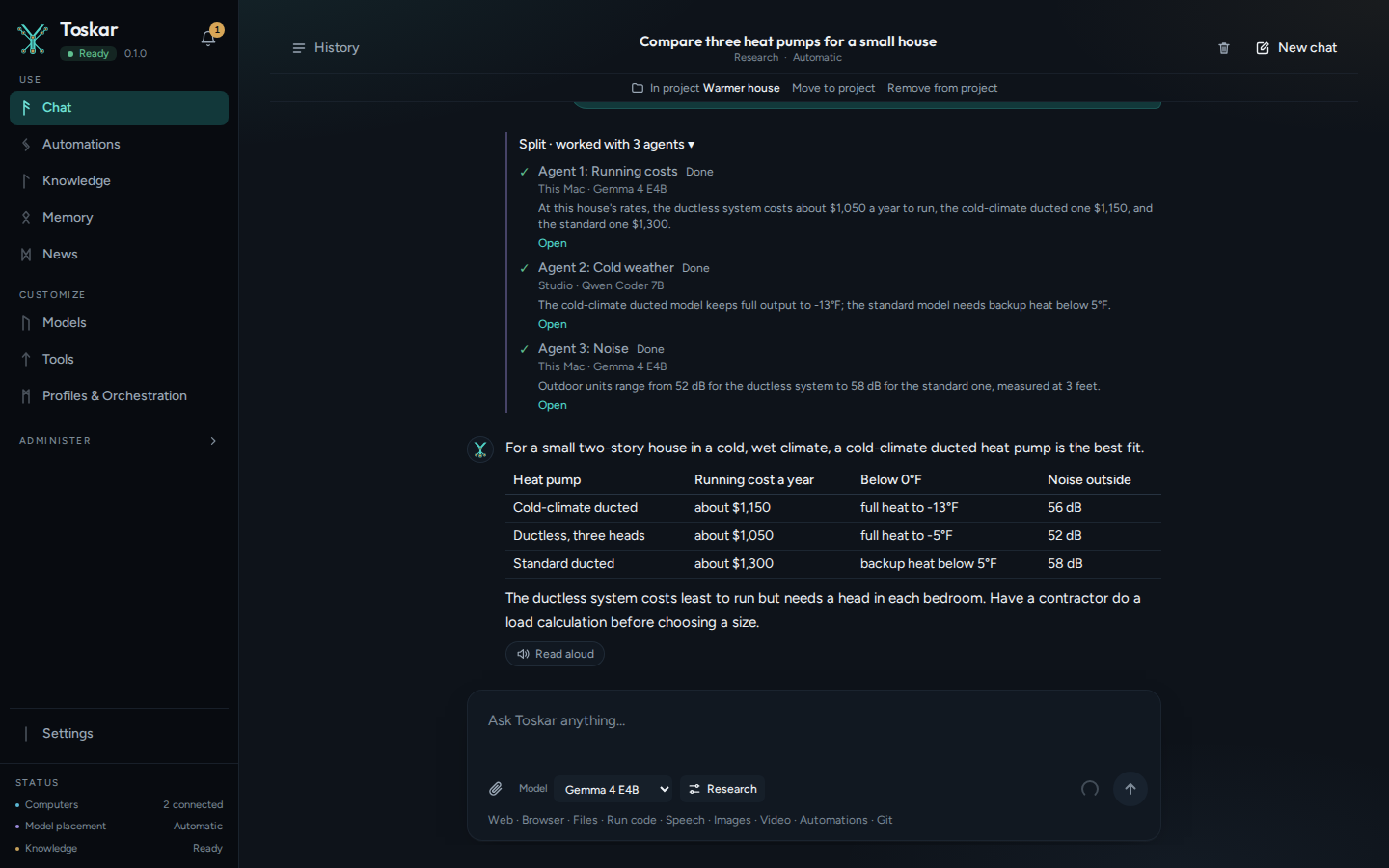
- Stop under a lane stops that agent alone. The others go on, and the answer uses what it finished.
- Stop beside the message box stops every agent.
- Open opens the agent's own chat. It says which agent it is, with a link back to the main chat, and you can read and continue it like any chat.
- History lists only the chat you started the swarm in. The agents' chats are in its project: on the project's page, that chat has a line such as 3 agents, which opens to them.
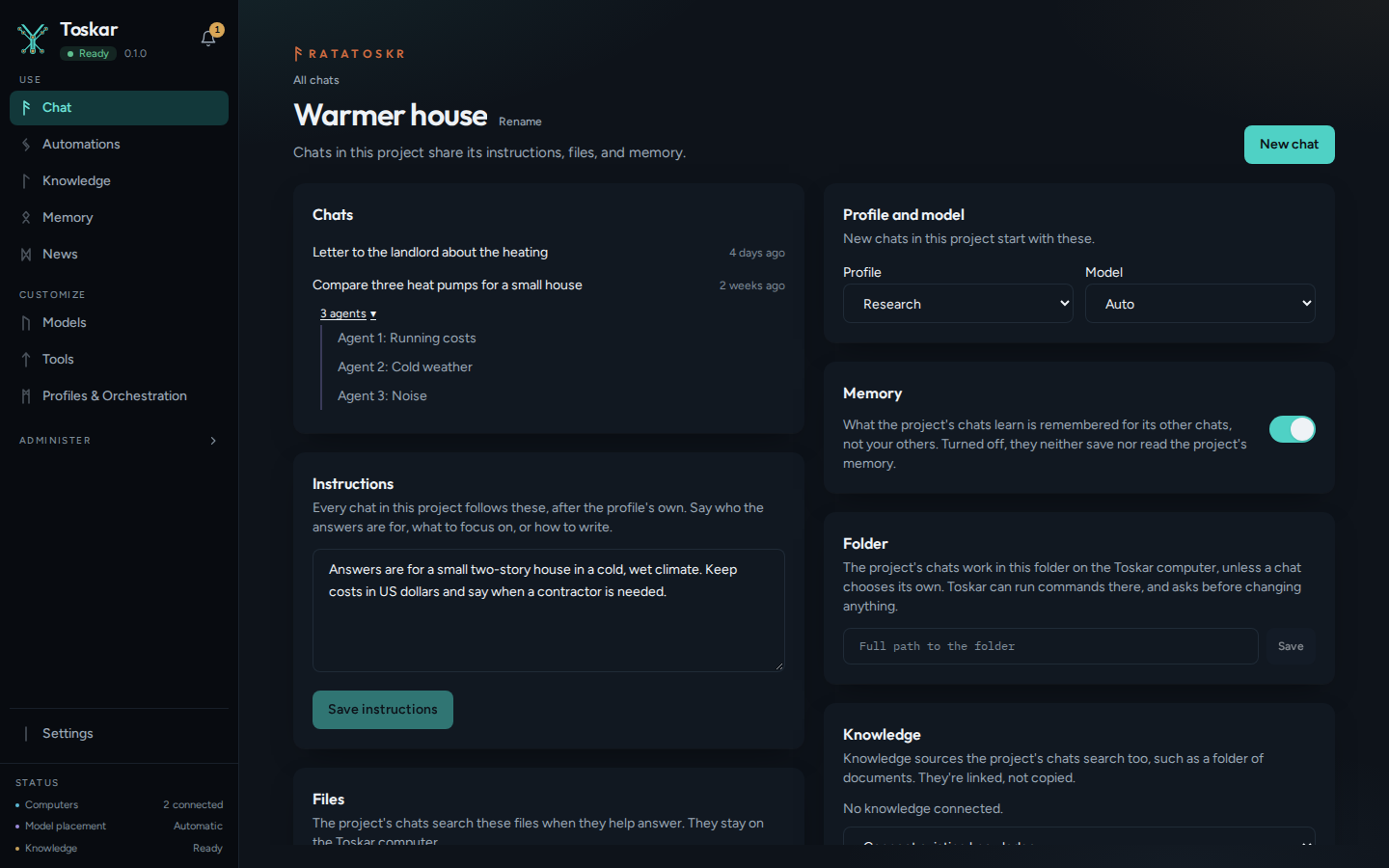
A swarm keeps its agents in chats, so it needs a project. When its agents start, a chat that isn't in one moves into a new project named after the request, and the line under the chat's title says so.
Tasks in a folder
In a chat with a folder, a request for work on its files is a task, such as fix the failing tests (Use Toskar in the terminal). A swarm can do a task too, for an Admin, on the web, the desktop app, or in the terminal. Before it plans, Toskar looks at the folder's files, reading only. It gives each agent a part and the files it expects to change, and parts that would change the same files go to one agent.
In a Git folder, each agent works in its own copy, called a worktree, on its own branch. Every copy starts from your folder as it is, including changes you haven't committed and new files Git doesn't ignore. Your branch, your staged changes, and your stashes are never touched.
- Each agent does its part in its own copy, and its work is saved on its branch, such as toskar/swarm/7c2e91d4/agent-1.
- Toskar merges the branches one at a time. If two agents changed the same lines, a fix-up agent settles it. If it can't, that agent's work is left out, and the lanes name its branch and files.
- Toskar runs the project's checks on the merge: go test, cargo test, npm test, pytest, or make test, whichever the project has.
- Toskar asks before it puts the change in your folder, unless your profile lets it write files without asking. When the checks failed, it always asks, and the question says so.
- The change goes in your folder as uncommitted changes, so you can look it over before you commit it.
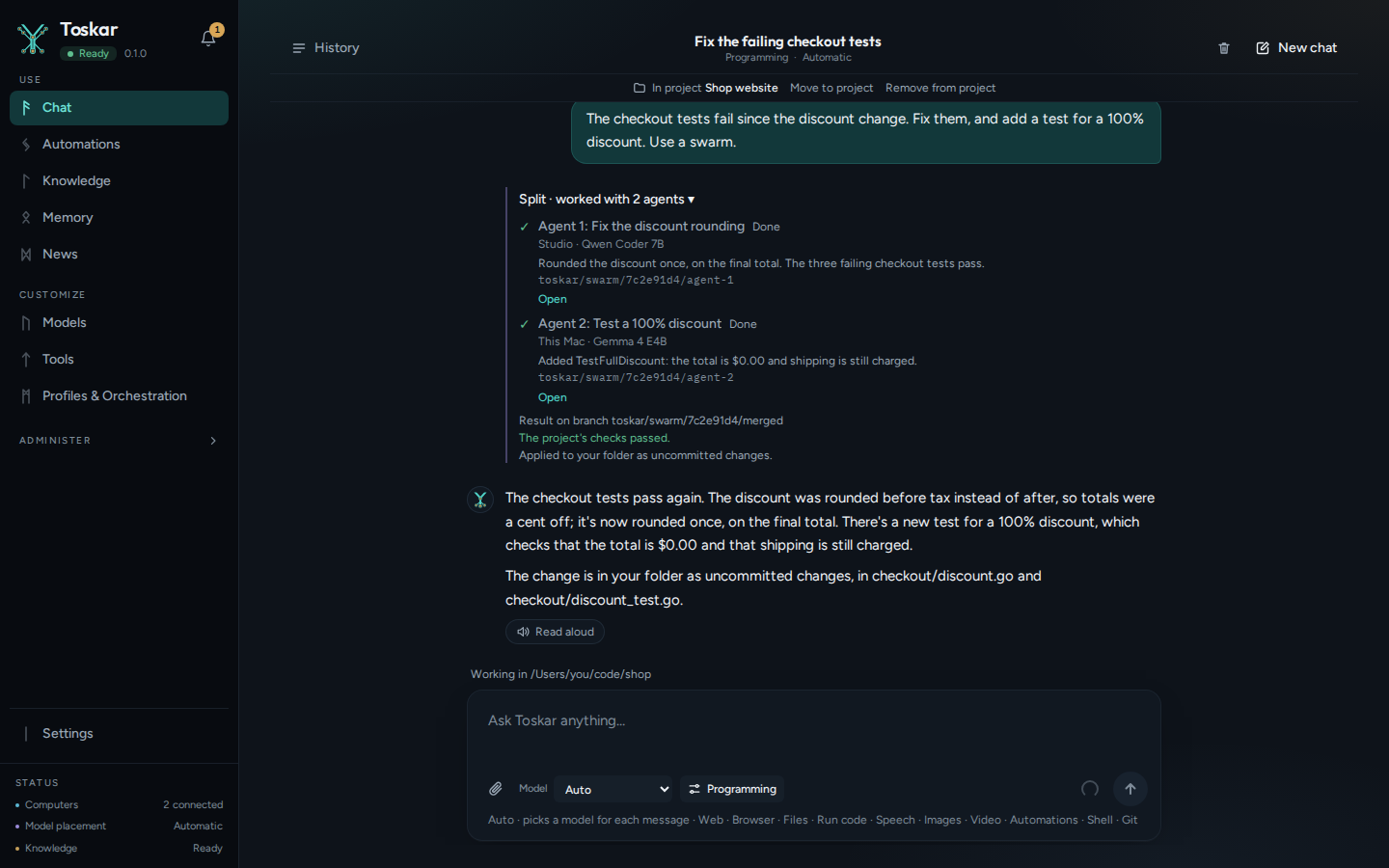
- Nothing is forced. If your folder changed while the agents worked, so the change no longer fits, it isn't applied, and the answer names the branch. Run
git mergewith that branch in your folder to bring it in. - In a race, each agent does the whole task in its own copy, and the checks run in each. An agent whose checks fail can't win over one whose checks pass.
- A folder that isn't in Git can't be copied safely, so the agents take turns in the folder itself. The answer says: Not a Git folder: the agents worked one after another in it. A race there runs as one agent.
- The copies are removed when the swarm ends. The branches are kept for 7 days, or until you delete the swarm with the API.
Approve an agent's tools
An agent's tools ask first, as any chat's do. In a task, its changes and commands ask as a task's do, whatever the profile allows in chat. Each question shows in the chat you started the swarm in, under the lanes, and starts with the agent that asks.
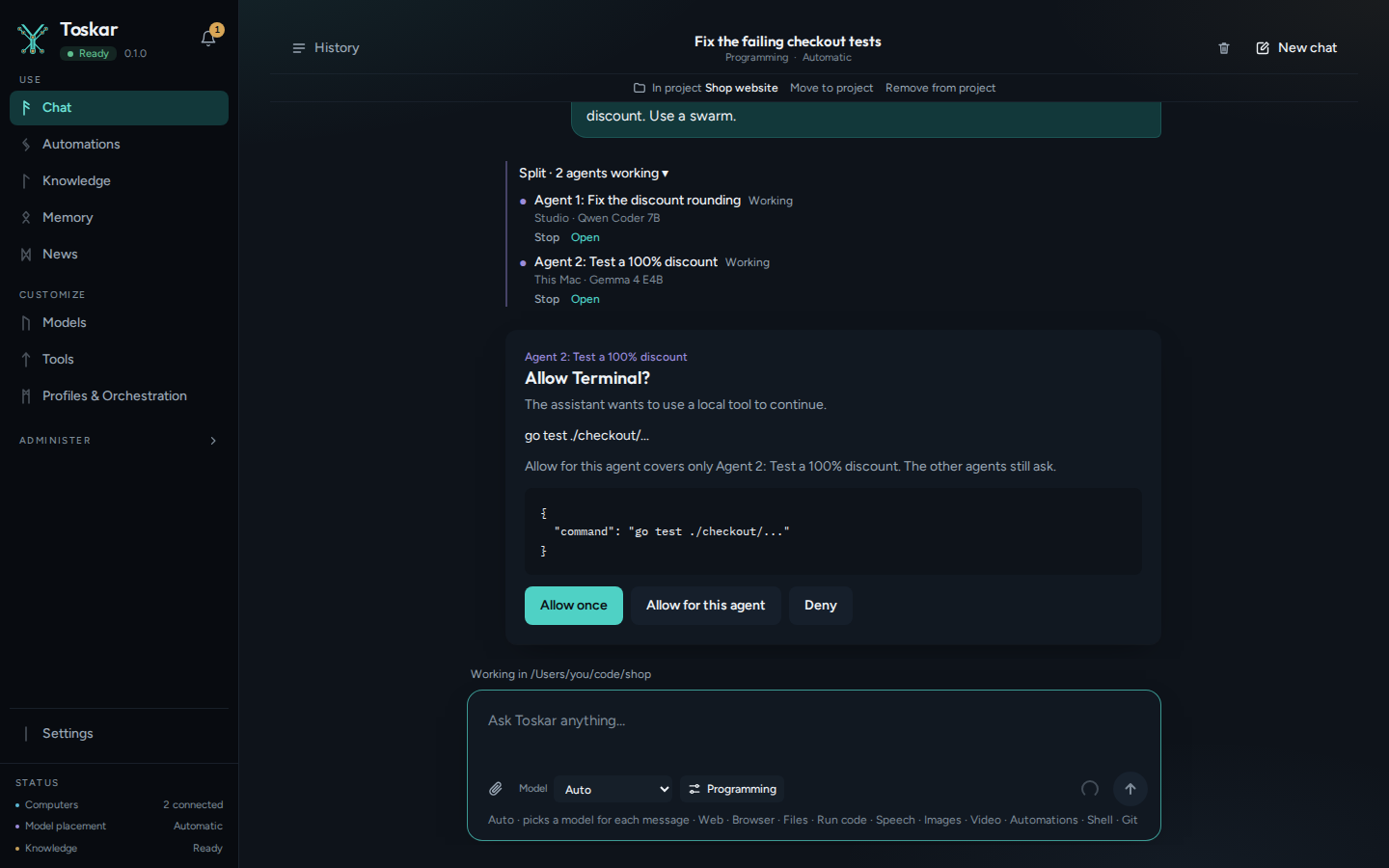
- Allow once lets this one call run.
- Allow for this agent lets that tool run for the rest of that agent's chat. It never covers the whole swarm, so another agent's call still asks.
- A destructive command, such as deleting files, always asks, and doesn't offer Allow for this agent.
- With nobody there to answer, such as from another app, a call that has to ask is refused.
Limits on a swarm
A swarm has a budget, so it can't run on without end. Set it in the profile's Swarm controls, or per swarm through the API.
| Budget | Default | What it limits |
|---|---|---|
| Agents | The profile's Workers, or 4 | How many agents a swarm uses, 2 to 8 |
| Tokens | 400,000 | Everything all the agents read and write together, 10,000 to 4,000,000. A token is about three quarters of a word |
| Minutes | 5 for a question, 30 for a task | How long a swarm may run, 1 to 240 |
| Tool calls | As for a task or a question | How many tools each agent may use |
When a swarm reaches its budget, agents still working stop, and those waiting don't start; their lanes say Out of budget. Toskar then merges what the others finished.
Agents at once on one model
A model on a computer answers one request at a time, so agents that share it take turns. Agents at once lets up to 4 agents use one model at the same time.
- In Settings, turn on Advanced mode.
- Open Models, then Installed.
- Open More actions beside the model, and choose a number under Agents at once.
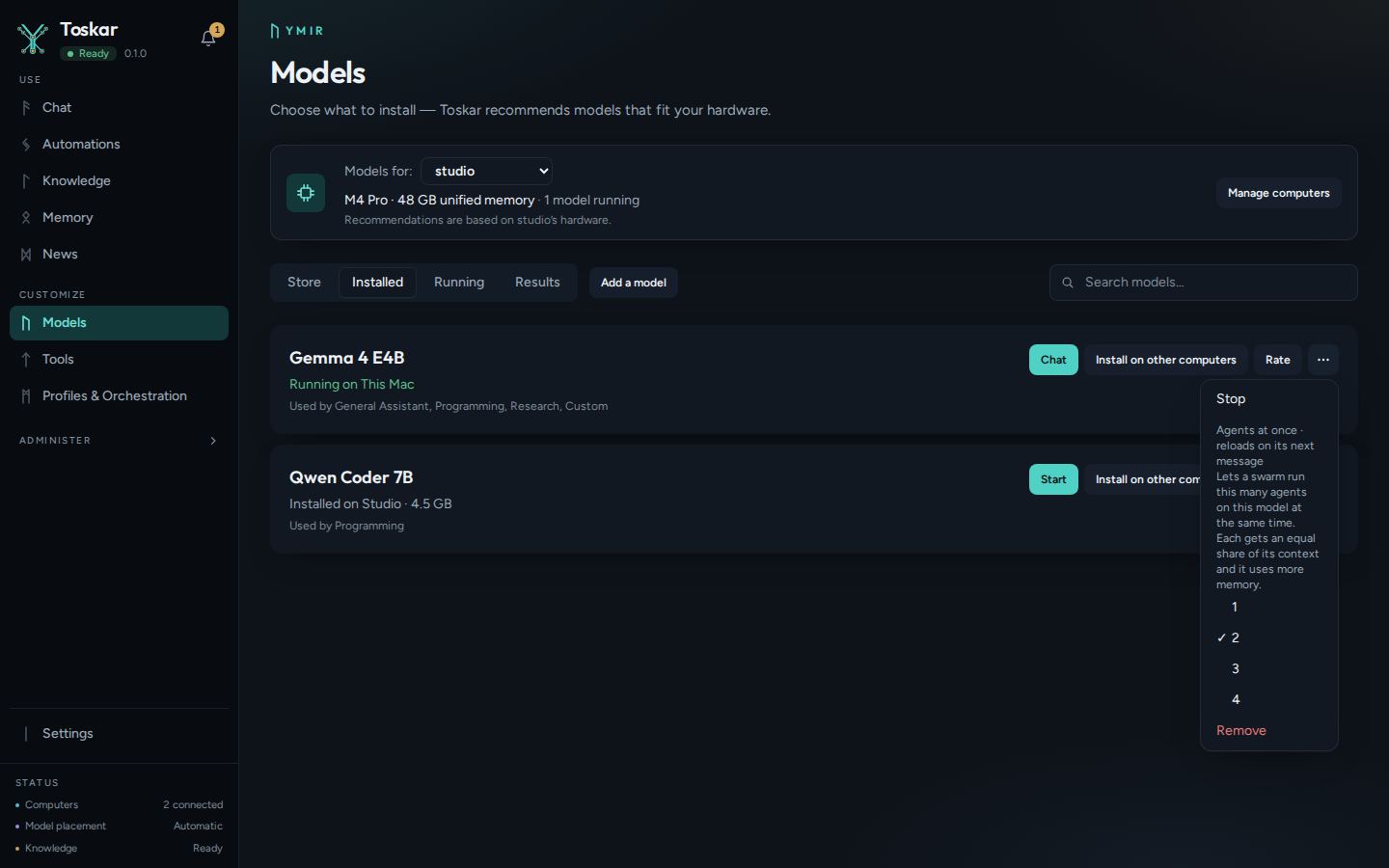
- Each agent keeps the model's whole context window, so the model needs more memory: about one more context window's worth for each extra agent.
- Toskar refuses a number that would leave an agent less than 8K of context, or that wouldn't fit your computer's memory, and says which.
- Agents that share a model each answer a little slower than one agent alone, but together they usually finish sooner.
- A model on a paired computer runs as many agents as it's set to on that computer.
From the terminal and VS Code
toskarctl chat --swarm sends every message in the chat to a swarm, and --swarm race to a race. While chatting, /swarm sends just the next message. Each agent has a line that updates as it works, then the answer comes. /agents lists the agents, and /open 2 continues agent 2's chat (Use Toskar in the terminal).
In VS Code, @toskar /swarm sends your question to a swarm, and @toskar /swarm race to a race. The chat shows each agent's steps, then the answer, with a summary of the agents and a link to the swarm's chat (Use Toskar in VS Code). From VS Code a swarm answers questions; start a task in a folder from Toskar or the terminal. /swarm comes in the extension's next release after 0.4.0.
Coding agents and other apps
Coding agents, such as Claude Code or Codex, start helpers called subagents, often several at a time. With one model on one computer, they wait for each other. A swarm profile spreads them out instead. Use swarm: and the profile's id as the model name, on any of Toskar's OpenAI and Anthropic formats. The profile's name with dashes between the words works too, such as swarm:coding-swarm for Coding swarm.
| The request | What Toskar does |
|---|---|
| Brings the agent's own tools, as subagents' requests do | Spread: sends the request as it is to the least busy of the profile's computers and models, and returns the answer unchanged. Requests sent together run at the same time on different ones |
| Has no tools | Runs a whole swarm on the last message, and answers with the swarm's answer. The agents' progress comes first, as the answer's reasoning |
For Claude Code, toskarctl connect claude-code --swarm and a profile point only its subagents at the swarm. Its own model, and its quick background requests, stay as they were, since those have no tools and would each run a whole swarm (Use Toskar in the terminal).
A request with no tools in Anthropic's Messages format gets the agents' progress as a thinking block, then the answer:
curl -s http://127.0.0.1:7331/v1/messages \
  -H "Content-Type: application/json" \
  -d '{"model": "swarm:general-assistant", "max_tokens": 1024, "messages": [{"role": "user", "content": "Plan a three-day trip to Juneau"}]}'
You’ll see something like:
{"content":[{…"thinking":"…","type":"thinking"},{"text":"…Juneau…","type":"text"}],…"model":"swarm:general-assistant",…}In OpenAI's Responses format, the progress is a reasoning item before the message:
curl -s http://127.0.0.1:7331/v1/responses \
  -H "Content-Type: application/json" \
  -d '{"model": "swarm:general-assistant", "input": "Plan a three-day trip to Juneau"}'
You’ll see something like:
{…"model":"swarm:general-assistant",…"type":"reasoning"},{"content":[{…"text":"…Juneau…","type":"output_text"}]…}In OpenAI's Chat Completions format, it's the message's reasoning_content (Connect another app through the API). Here, with one model on one computer, the reasoning says why the swarm ran as one agent.
Apps that speak MCP, such as Claude Desktop or Cursor, get a run_swarm tool from Toskar's MCP server. It takes the request, and optionally mode (split or race) and profile. It returns the swarm's answer and a link to its chat:
curl -s http://127.0.0.1:7331/mcp \
  -H "Content-Type: application/json" \
  -H "Accept: application/json, text/event-stream" \
  -d '{"jsonrpc": "2.0", "id": 1, "method": "tools/call", "params": {"name": "run_swarm", "arguments": {"prompt": "Plan a three-day trip to Juneau"}}}'
You’ll see something like:
{"jsonrpc":"2.0","id":1,"result":{"content":[{"text":"…Juneau…\n\nCoordinator chat: … (open it in Toskar at /chat?c=…)","type":"text"}],"isError":false}}Who can do what, from another computer with a key from API Access:
| What | Who or which key |
|---|---|
| Start a swarm in any way | A Member or an Admin. A Visitor's key, or a chat page's guest, is refused |
| A task in a folder | An Admin, on the web, the desktop app, or in the terminal |
swarm: requests that bring tools | A key with Drive models directly, for coding agents, as for the agent's own model. A key limited to one profile can't |
swarm: requests without tools, and run_swarm | A Member or an Admin. A key limited to one profile can name only that profile, and a chat-only key can't, since a swarm saves chats |
With the API
Apps that want the lanes use /api/v1/swarms. Start one with your request, and optionally mode, conversation_id (a chat of yours to run it in), and budget (agents, tokens, minutes). Toskar answers at once, while the agents work:
curl -s http://127.0.0.1:7331/api/v1/swarms \
  -H "Content-Type: application/json" \
  -d '{"prompt": "Plan a three-day trip to Juneau: where to stay, what to do, and what to pack", "mode": "split"}'
You’ll see something like:
{"id":"…",…"mode":"split","status":"running",…}Then read it back by its id. This starts one, waits until it has finished, and reads it. The record has each agent's part, computer, model, status, and summary, and a note when it ran as one agent:
swarm=$(curl -s http://127.0.0.1:7331/api/v1/swarms \
  -H "Content-Type: application/json" \
  -d '{"prompt": "Plan a three-day trip to Juneau"}' | grep -o '"id":"[^"]*"' | head -1 | cut -d '"' -f 4)
until curl -s http://127.0.0.1:7331/api/v1/swarms/$swarm | grep -q finished_at; do sleep 2; done
curl -s http://127.0.0.1:7331/api/v1/swarms/$swarm
You’ll see something like:
{"id":"…",…"status":"done",…"agents":[…],…"finished_at":"…"}POST /api/v1/swarms/{id}/stop stops every agent, and stopping one agent's chat with POST /api/v1/chat/stop stops that agent alone. GET /api/v1/conversations?swarm_id= lists a swarm's chats. DELETE /api/v1/swarms/{id} deletes a finished swarm's record and the branches it kept; its chats stay. POST /api/v1/chat also takes swarm, split or race, for one message.
On your phone, tablet, TV, car, and watch
The Toskar apps don't show a swarm's lanes yet. Where an app lists your computer's chats, the chat you started a swarm in shows with its answer, like any other answer, and the agents' own chats aren't listed. Start and watch a swarm on the computer: on the web, in the desktop app, in the terminal, or in VS Code.
Limits
- Agents run at the same time only on different computers, on different models, or on a model with Agents at once above 1. Otherwise a swarm runs as one agent.
- Use a swarm and use 3 agents in a message are understood in English only.
- A task in a folder needs an Admin, and is started on the web, the desktop app, or in the terminal.
- A race needs at least two models, and a race on a task needs a Git folder.
- The apps on your phone, tablet, TV, car, and watch show a swarm's answer, but not its lanes.
Troubleshooting
| What you see | What to do |
|---|---|
| One agent: this computer can't run more than one at a time with this model | Pair another computer, add a second model to the profile's swarm, or raise Agents at once on the model |
| One agent: this request doesn't split into parts that can be done separately | Name the parts in your request, or use a race |
| One agent: a race needs at least two models to compare | Add a second model under the profile's swarm Models |
| One agent: a swarm works on a task in a folder, and this task has none | Choose a folder for the chat, or for its project |
| One agent: a race on a task needs a Git folder, so each agent has its own copy | Use a split, or put the folder in Git with git init |
| Not applied to your folder. To use it, merge the branch with Git | In your folder, run git merge with the branch it names |
| An agent's changes conflict, so they weren't merged | They're kept on the branch the line names. Merge it with Git and settle the conflict yourself |
| Use a swarm isn't in Chat options | Swarms need a Member or an Admin account |
| Agents at once, or Edit on a profile, isn't there | Turn on Advanced mode in Settings |
A coding agent gets 404 MODEL_NOT_FOUND for a swarm: model | Check the profile's id or name. Then check that one of the profile's swarm models is installed on a computer that's on |
A coding agent gets 403 "this key can't drive a model directly" | Give the key Drive models directly, for coding agents, in API Access |
These pages describe Toskar 1.14.1. Download 1.14.1 and its release notes ↗ · Need help? Report a bug or request a feature ↗