
You’re reading the docs for 1.14.0, an older release. Read the latest →
Documentation / 1.14.0
Pictures, clips, speech, and vision
Make and change pictures, make short clips, ask about a picture or a video, and have audio transcribed or answers read aloud, all on your own computers.
Toskar makes pictures and clips on your own computers; the prompt and what it makes aren't sent anywhere. Each model needs enough memory: system memory, or unified memory on Apple silicon, and graphics memory on a computer with its own graphics card. Better hardware makes a model faster or lets a larger one run; it doesn't change what a given model can draw.
Pictures. FLUX.2 [klein] 4B makes and edits pictures and is comfortable with 12 GB of memory (a 5.2 GB download, about 10 to 22 seconds a picture on a 24 GB graphics card); its high-quality build wants 20 GB. Z-Image-Turbo makes photorealistic pictures with clear text in them and wants about 14 GB (6.7 GB download, about 35 to 40 seconds). Qwen-Image-Edit-2511 only edits, keeping what you didn't ask to change, and wants 32 GB (19.5 GB download, about 80 seconds an edit).
Clips. Wan 2.2 TI2V 5B makes clips from a description or a picture and is comfortable with 16 GB (8.5 GB download; about a minute for 2 seconds on a 24 GB graphics card, about 3½ minutes on a 24 GB Apple silicon Mac). Wan 2.1 T2V 1.3B fits smaller computers, about 10 GB, at about 3 minutes for 2 seconds. Wan 2.2 T2V A14B makes higher-quality clips much more slowly and wants 48 GB, about 13 minutes for 2 seconds.
On the Tools page and in a chat's offer to set it up, each model is judged for the computer it would run on. The one that suits it is marked Recommended for this computer. One that needs more memory says how much it needs and how much the computer has, and that it may be slow or fail. A model not yet measured on real hardware is labeled untested and never recommended. On Apple silicon, the graphics can use about two thirds of the computer's memory (three quarters above 36 GB), so a model comfortable with 24 GB may be tight on a 24 GB Mac.
When memory is short, Toskar unloads chat models in its way while a picture or clip is made. If it still runs out, the answer says so and suggests a smaller picture, a shorter or smaller clip, a lighter model, or a paired computer with more memory, which can make it for this one.
Pictures are up to 1536 pixels on a side, and clips 2 seconds unless you ask for more, up to 5 seconds at about 832×480; asking for more makes the most the model allows, and the answer says so. Slow pictures or clips usually mean the CPU is making them: the Tools page says which, and on Linux and Windows the GPU needs a Vulkan driver (see Is my model using the GPU?). The Mac App Store build can't make pictures or clips, since its sandbox can't run a program Toskar downloads; use Toskar from outside the Mac App Store, or a paired computer.
Some models, such as FLUX.2 [klein] 9B, have a non-commercial license. Toskar sets one up only when you bring your own: accept the license on Hugging Face, add a Hugging Face read token on the Tools page, and confirm your license covers your use. Every other model and part is Apache 2.0 or MIT, needs no account, and is checked against its published checksum.
While a picture or clip is made on this computer, the chat says whether the model is loading, which step it's on, and about how long is left, with a frame where it will appear. On a long wait, a line says what Ratatoskr is up to.
What you need
- Toskar from outside the Mac App Store to make pictures or clips. The Mac App Store build can't run the program that makes them, so use a paired computer for those.
- Enough memory for the model, below. Pictures want about 12 GB, and clips about 16 GB.
- A download the first time: 5.2 GB for the picture model, or 8.8 GB for its high-quality build on a computer with more memory; 8.5 GB for clips; about 4 GB for a model that can see; and a speech model the first time you transcribe or hear an answer read aloud. After that, all of it works offline.
- Your role allowed to make pictures, make video, use voice, or send pictures, which an Admin sets in People.
Make a picture
- In a chat, describe it, such as "a watercolor of a lighthouse at dusk".
- The first time, the answer offers to set up a model that suits this computer, with its download size. Choose to set it up, or set it up from Tools → Images and video.
- While it's made, the chat shows whether the model is loading, which step it's on, and about how long is left.
- The picture is attached to the answer, as a PNG you can open or download.
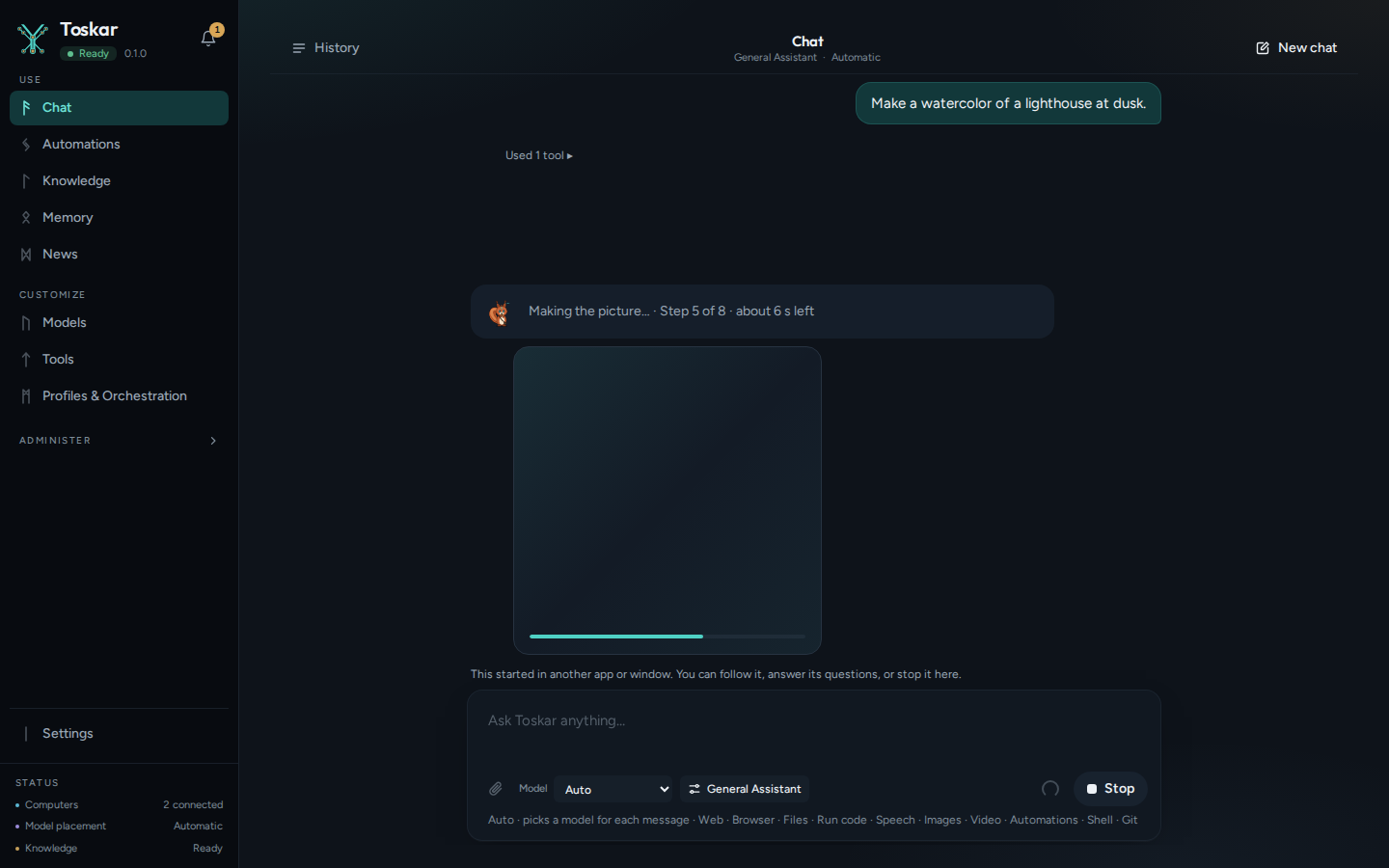
Pictures are 1024 by 1024 pixels unless you ask for another size, up to 1536 on a side. Ask for a quick draft or for high quality to choose the model's fast or best setting. To make one again with a change, ask for the same seed: each picture's details say which it used.
Change a picture
- Attach a PNG or JPEG, or use a picture made earlier in the chat.
- Say what to change, such as "make it night" or "remove the car".
- The changed picture is attached to the answer as a new file, and the original stays as it was.
Make a clip
Describe a clip, such as "a short video of waves rolling onto a beach", or attach a picture and ask to bring it to life. A clip takes several minutes, and it plays in the chat.
| Setting | Default | Range |
|---|---|---|
| Length | 2 seconds | 1 to 5 seconds; asking for more makes the most the model allows, and the answer says so |
| Size | 832 by 480, landscape, or the picture's shape | Smaller is faster and needs less memory |
| Quality | The profile's setting | Fast, balanced, or best, each with its own model |
A profile's Picture and clip quality, in its Strategy and computers tab, sets the quality used when a request doesn't ask for one (Profiles).
Set up pictures and clips
Tools → Images and video shows what's set up and the models on offer, each with its download size and license. The one that suits this computer is marked Recommended for this computer. One that needs more memory says how much it needs and that it may be slow or fail, and one under a non-commercial license is marked Needs your license.
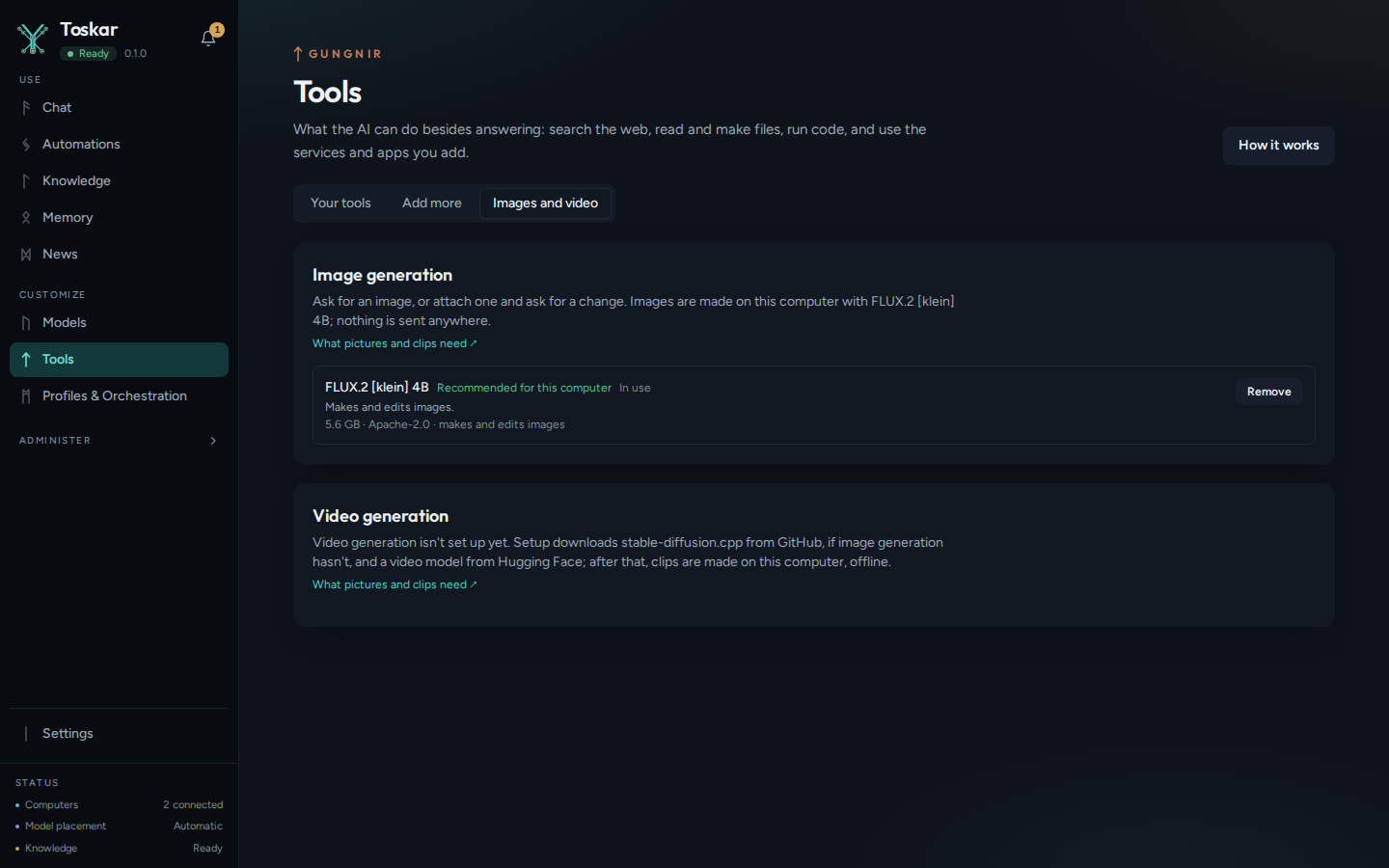
The same status comes from the API, here and on a paired computer with ?node_id=:
curl -s http://127.0.0.1:7331/api/v1/images/setupYou’ll see something like:
{…"ready":false,…"models":[…"id":"flux2-klein-4b"…]…}Ask about a picture or a video
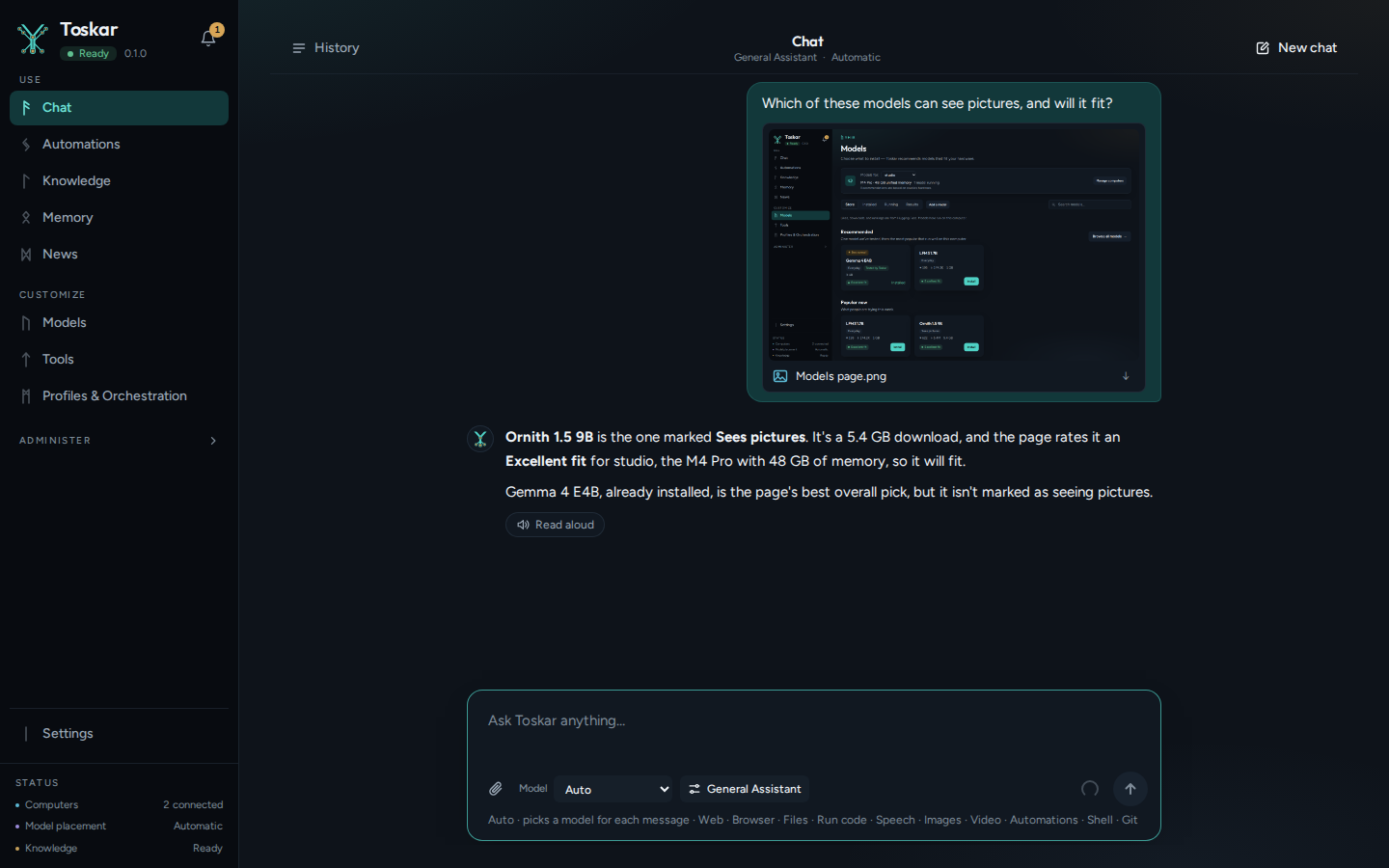
- Attach a picture, a screenshot, or a video to a message, and ask about it.
- A model that can see answers, even when you chose another for the chat. If none is installed, the answer offers one to set up, with its download size.
- A video is read from its sound and from pictures taken from it.
Speech in and out
- Attach a voice memo or recording and ask what it says. Toskar transcribes it on this computer.
- Read aloud, under an answer, reads it to you. You can also ask for something to be read aloud as an audio file, which plays in the chat.
- The first time, Toskar sets up speech and downloads a speech or voice model; after that it works offline.
Troubleshooting
- It's slow: the computer's processor may be making it, not its graphics. The Tools page says which; on Linux and Windows the graphics need a Vulkan driver (Is my model using the GPU?).
- It ran out of memory: ask for a smaller picture or a shorter, smaller clip, choose a lighter model, or use a paired computer with more memory (Computers).
- I can't make pictures in the Mac App Store build: its sandbox can't run the program that makes them. Use Toskar from outside the Mac App Store, or a paired computer.
- A model asks for a Hugging Face token: it has a non-commercial license. Accept it on Hugging Face, add a read token on the Tools page, and confirm your license covers your use.
- The answer offers to set up a model that can see: none is installed. Choose Set it up, and the answer comes once it's ready.
These pages describe Toskar 1.14.0. Download 1.14.0 and its release notes ↗ · Need help? Report a bug or request a feature ↗