
You’re reading the docs for 1.14.0, an older release. Read the latest →
Documentation / 1.14.0
Compare independent drafts
Have a profile draft each answer three times on its own and compare them, to catch slips in math and reasoning.
A profile can have its answers drafted three times, independently, and compared before you see one. Small models make reasoning slips, such as a wrong step in a word problem, and a second and third draft that don't see the first often catch them. The extra drafts run on paired computers when there are any, at different settings, so they don't simply repeat each other.
When the drafts' final answers are short, such as a number, a date, or a name, they are compared: when most agree, that answer is kept and nothing more runs. When they disagree, or the answers are too long to compare, each draft is checked against the others, and a judge writes the answer from the drafts and the checks, saying where they still disagree. If anything fails along the way, the answer you would have had without drafts stands.
It's off by default. It makes answers slower and uses more of your computers, and it helps most with math, logic, and questions that take several steps. Team profiles have their own reviewer and don't compare drafts. Small talk, pictures, and answers that must be in a fixed format are answered once.
- Open Profiles & Orchestration, edit a profile, and open Strategy and computers.
- Set Compare independent drafts to Always, and save.
- To choose the models, open Models, choose Show all roles, and set Drafter and Judge. Without them, the drafts use the profile's model and the judge uses its Reviewer, or its model.
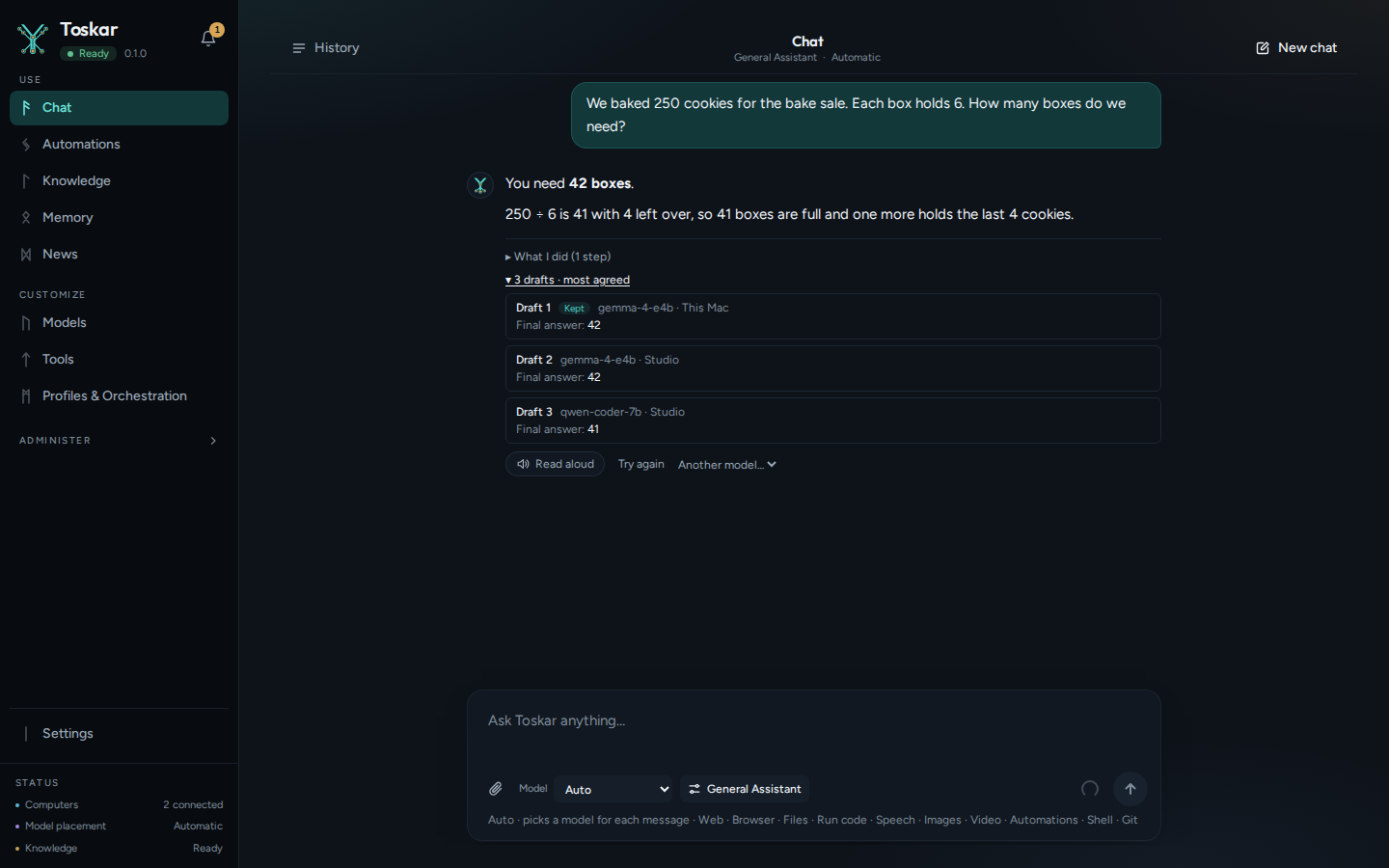
- Under an answer, the drafts line, such as 3 drafts · they agreed, opens to each draft's model, computer, and final answer, the checks, and the judge. The steps say how it went. The phone app shows the same.
It's like asking three people to work a problem separately, then going with the answer most of them got. The extra drafts run on paired computers when there are any, at different settings, so they don't simply repeat each other.
When it helps
| Worth it | Not worth it |
|---|---|
| Math and word problems | Small talk and quick questions |
| Logic and puzzles | Pictures and clips, which are made once |
| Questions that take several steps | Answers that must be in a fixed format, which are written once |
| A small model you want more from | Team profiles, which have their own reviewer |
Turn it on
- Open Profiles & Orchestration and choose Edit on a profile. Editing needs Advanced mode, in Settings.
- Open Strategy and computers, set Compare independent drafts to Always, and choose Save profile.
- To choose the models, open Models, choose Show all roles, and set Drafter and Judge. Without them, the drafts use the profile's model, and the judge uses its Reviewer, or its model.
What you see
Under an answer, a line says how the drafts went, such as 3 drafts · most agreed. Choose it to see each draft's model, computer, and final answer, with the one kept marked.
| The line says | What happened |
|---|---|
| they agreed | Every draft's final answer was the same, and that answer is kept |
| most agreed | Most drafts agreed, and their answer is kept |
| they disagreed | No answer won, and the first draft is shown |
| a judge reconciled them | They disagreed, and a judge wrote the answer from the drafts and their checks |
| too long to compare | The answers were too long to compare, and the first is shown, or a judge combined them |
What I did, under the answer, lists the same in its steps. The Toskar app on your phone shows the drafts too.
What it costs
Drafting three times takes about three times the work, so answers take longer. With paired computers, the extra drafts run on them, which keeps them busy. For most everyday questions, leave it Off, and choose Thorough effort for the ones that need care (Get more careful answers).
These pages describe Toskar 1.14.0. Download 1.14.0 and its release notes ↗ · Need help? Report a bug or request a feature ↗