
You’re reading the docs for 1.14.0, an older release. Read the latest →
Documentation / 1.14.0
Get more careful answers
Give a hard question more care, with Effort, a model that thinks first, a profile's Reasoning level, or compared drafts.
Toskar has four ways to give a question more care: Effort in the chat, a reasoning model, a profile's Reasoning level, and comparing independent drafts. Each makes answers slower, and some need more memory, so save them for questions that need it, such as math, logic, plans with several steps, and questions about your data.
Effort, in the chat's options, sets how much work goes into an answer. Fast answers in one go, on a model that's already loaded. Balanced plans requests with several parts, reads a page for each look-up, and corrects figures once. Thorough reads more pages, checks figures twice, and uses the largest model that fits, even for a quick question. Auto keeps quick questions fast and gives questions about your data, and requests with several parts, more care. Your choice is remembered. When an answer missed something, ask again with Thorough.
Some models think before they answer: they work through the problem first, then write the answer. Models marks them Reasoning, and Recommended suggests one as Best for careful reasoning. They do better at math, logic, and puzzles, and take longer to start answering. Model Auto doesn't pick one, even at Thorough, unless no other installed model fits, so a quick question never waits on one. To use one, choose it in the chat's model menu; the chat keeps it until you choose another. With gpt-oss, Effort also sets how long it thinks, as its own low, medium, and high reasoning effort: briefly on Fast, at length on Thorough. From the API, reasoning_effort low, medium, or high does the same.
While a reasoning model thinks, the chat says Reasoning… with how long it has taken, on the web and in the Toskar app. Under the answer, What I did says how long it thought, and Thinking opens what it thought, folded away until you want it.
A profile's Reasoning level is the effort its chats use when Effort is left on Auto. Set it to Thorough on a profile you use for careful work, such as Research, and its chats get that care without choosing it each time. It's under Orchestration, in the profile's Strategy and computers tab in Profiles & Orchestration.
When one draft isn't enough, a profile can draft each answer three times, independently, and compare them before you see one. See Compare independent drafts. It catches slips a single draft makes, such as a wrong step in a word problem, and takes longer and uses more of your computers.
More care costs time and memory. Thorough and larger models take longer to load and to answer, a reasoning model writes its thinking before the answer, and compared drafts run three times. A larger model needs more memory, and a reasoning model's thinking takes room in its context window while it answers.
Most questions need one quick answer. Some, such as math, logic, plans with several steps, and questions about your data, are worth more care, the way you'd check a sum twice. Toskar has four ways to give it, and each makes answers slower.
| Way | Where | What it costs |
|---|---|---|
| Effort | The chat's options: Fast, Balanced, Thorough, or Auto | Time: Thorough reads more and checks figures twice |
| A model that thinks first | The chat's model menu: models marked Reasoning | Time before the answer starts, and room in the model's window |
| Reasoning level | A profile's Strategy and computers tab | The same as Effort, for every chat that leaves Effort on Auto |
| Compared drafts | A profile's Compare independent drafts | About three times the work, or your other computers' time |
Effort
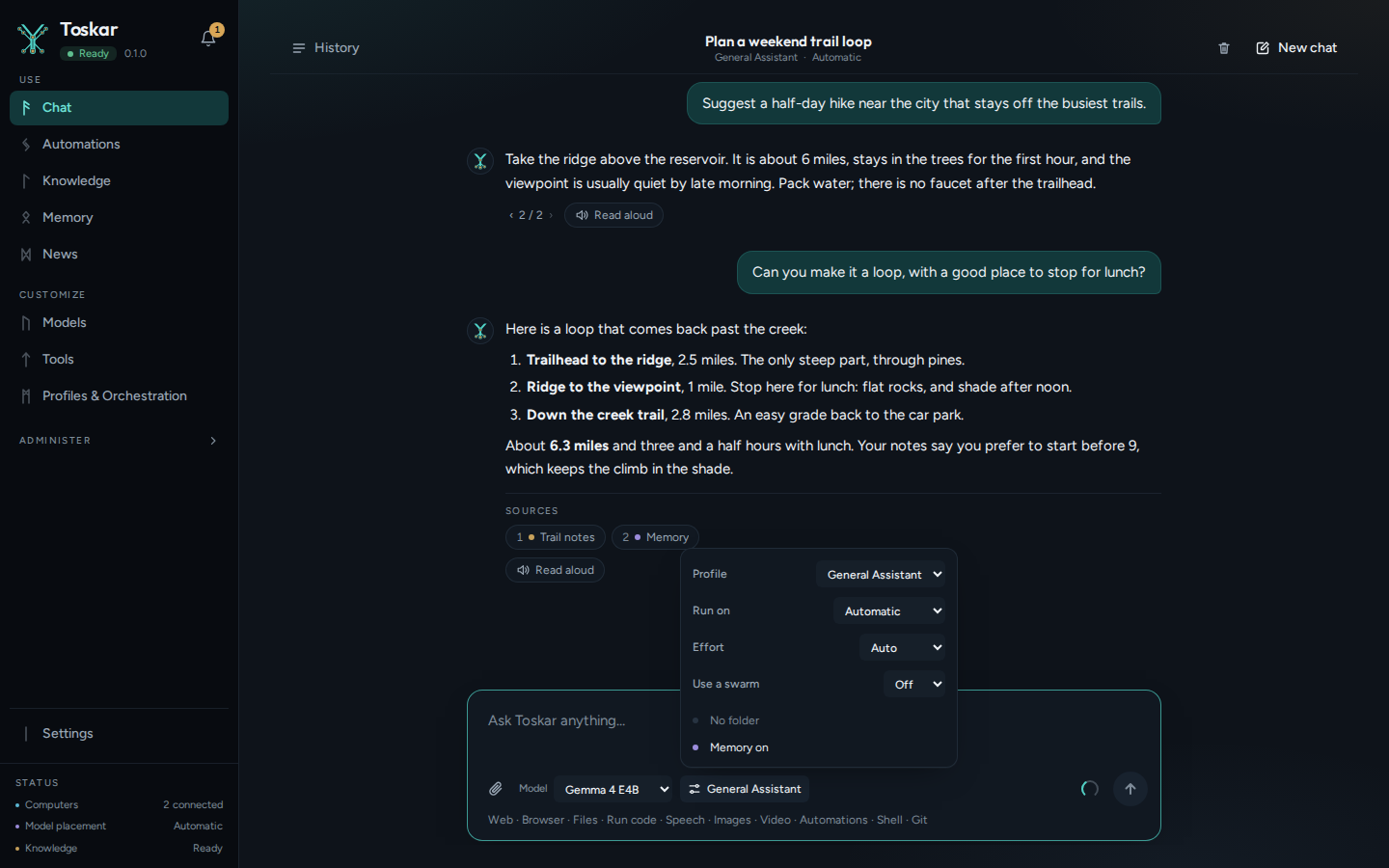
| Effort | What it does |
|---|---|
| Fast | Answers in one go, on a model that's already loaded |
| Balanced | Plans requests with several parts, reads a page for each look-up, and corrects figures once |
| Thorough | Reads more pages, checks figures twice, and uses the largest model that fits, even for a quick question |
| Auto | Keeps quick questions fast, and gives questions about your data and requests with several parts more care |
Your choice is remembered. When an answer missed something, ask again with Thorough.
A model that thinks first
While a reasoning model thinks, the chat says Reasoning… with how long it has taken. Under the answer, What I did says how long it thought, and Thinking opens what it thought. Model Auto doesn't pick one unless no other installed model fits, so choose it in the chat's model menu.
For a profile you use for careful work
- Open Profiles & Orchestration and choose Edit on the profile. Editing needs Advanced mode, in Settings.
- Open Strategy and computers and set Reasoning level to Thorough.
- For math and reasoning, also set Compare independent drafts to Always.
- Choose Save profile.
These pages describe Toskar 1.14.0. Download 1.14.0 and its release notes ↗ · Need help? Report a bug or request a feature ↗